How to Make a FiveM Server
On this page
FiveM turns Grand Theft Auto V into your own multiplayer world — roleplay, racing, drift and freeroam servers built on frameworks like ESX and QBCore. Making one comes down to two honest routes: self-host FXServer yourself, or rent a managed server that is online in minutes.
This guide walks through both, start to finish. The self-hosted path is a real tutorial — license key, artifacts, server.cfg and txAdmin — so you understand every moving part. The hosted path shows what you skip when the setup, updates, database and DDoS protection are someone else's job. Either way you will know how much RAM you need and how players actually connect.
What you need before you start
FiveM is the modification framework that powers custom GTA V multiplayer. The server software (FXServer) is free; players join from the free FiveM client, but each of them needs a legitimate copy of GTA V. Before you build anything, line these up:
- A Cfx.re account and a server license key. Free from the keymaster, and required to boot the server. We cover it in the next step.
- A machine that stays on. FiveM has to run around the clock on a public connection. A spare gaming PC works for a LAN test, but a real community needs a persistent Linux box or hosting — more on why below.
- A framework decision. Most servers run ESX or QBCore (jobs, money, inventory for roleplay); freeroam and racing servers often stay closer to standalone. You can change your mind later.
- A little time. Budget an hour for your first self-hosted boot; a hosted server is ready in minutes.
FiveM is heavier than most game servers — RAM and single-thread CPU speed decide how smoothly it runs, far more than raw player count. A light or vanilla server is happy on 6 GB; an active ESX/QBCore server with 30-80 resources wants 8 GB; a busy roleplay server with 200+ resources, custom MLOs and streamed vehicles needs 12-16 GB.
Step 1: Get your free Cfx.re license key
Every FiveM server needs a license key. It is free and takes two minutes.
- Sign in to the keymaster. Go to keymaster.fivem.net and log in with your Cfx.re (forum) account.
- Register a new server key. Choose a label, pick "I will run the server on a dedicated machine" (works for hosting too), and enter the IP where the server will run — or generate a portable key if your IP may change.
- Copy the key. You will paste it into
server.cfgassv_licenseKeyin the next steps.
Path A: Self-host FiveM with FXServer and txAdmin
This is the full, free-software route. Modern FXServer boots straight into txAdmin, a web panel that sets up and runs the server for you, so most of the work happens in a browser. These steps are for a Linux box (the realistic choice for a public server); Windows follows the same shape with the Windows artifact.
- Download the FXServer artifacts. Grab the latest recommended build from the FiveM artifacts page (Linux or Windows) and unpack it into an empty folder — this is the server runtime.
- Get the base resources. Clone the official starter data next to the artifacts so the server has a baseline of resources to load:
git clone https://github.com/citizenfx/cfx-server-data.git server-data
- Start FXServer to open txAdmin. From the artifacts folder, run the server pointing at a data folder. It launches txAdmin and prints a one-time PIN and a web address (default port 40120):
./run.sh +set serverProfile default +set txAdminPort 40120
Open that address in a browser, enter the PIN, and create your admin account. - Run the setup deployer. In txAdmin, start a new deployment: point it at your
server-data, paste your Cfx.re license key from Step 1, and let it build yourserver.cfg. Set your server name,sv_maxclients(up to 32 on the free key) and a database connection if your framework needs one. - Confirm the endpoints and license. Your
server.cfgshould contain the essentials — txAdmin manages this, but it is worth knowing what it writes:endpoint_add_tcp "0.0.0.0:30120" endpoint_add_udp "0.0.0.0:30120" sv_licenseKey "your_key_here" sv_hostname "My FiveM Server" sv_maxclients 32 ensure mapmanager ensure chat ensure spawnmanager ensure sessionmanager
- Forward port 30120. FiveM uses port 30120 on both TCP and UDP. On a home connection, log into your router, find Port Forwarding, and forward TCP and UDP 30120 to the machine running the server (give it a static local IP first).
Heads up: opening a port publishes your home IP, and FiveM servers are a favourite target for attacks. A single booter can knock your whole household offline, and a home line has nothing in front of it. Only self-host publicly if you understand that risk.
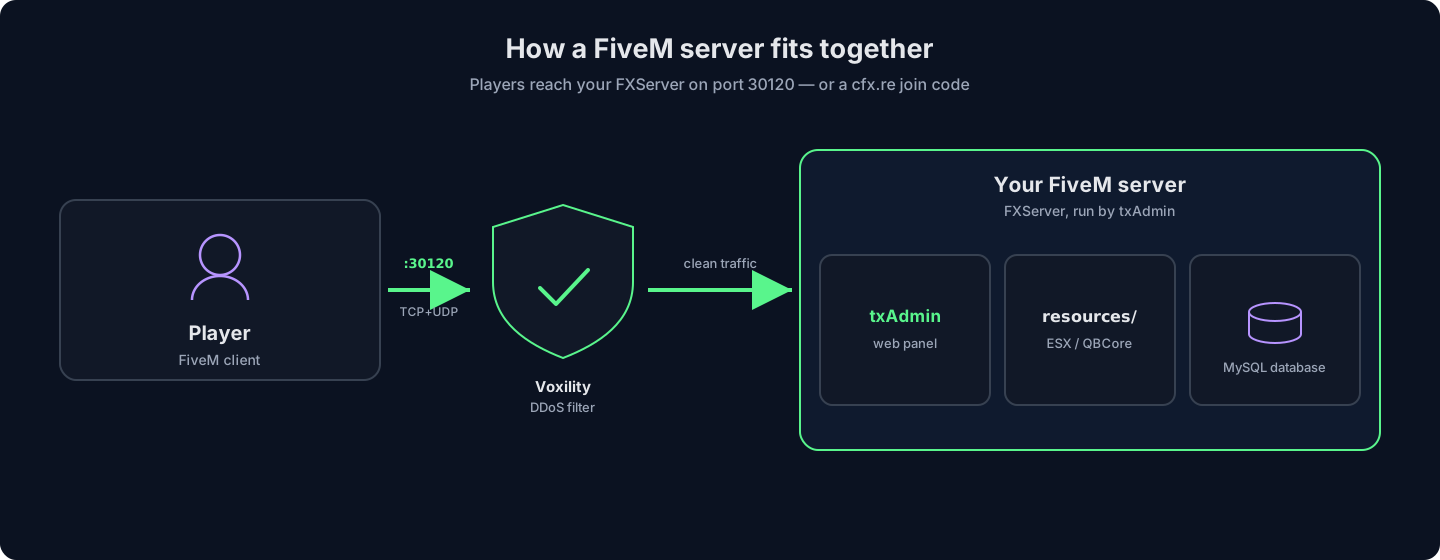
How the pieces fit: players reach your FXServer on port 30120 (or a cfx.re/join code); txAdmin runs it, resources and MySQL power your framework, and DDoS filtering sits in front.
That is a working server. Before you make it permanent, weigh what self-hosting actually costs you:
What's great about self-hosting
- Free server software, full control of every file
- You learn exactly how FXServer and txAdmin work
- Fine for a quick LAN or test server
What you are taking on
- The machine has to stay on 24/7 on a public connection
- Your home IP is exposed with no DDoS protection in front of it
- Artifact updates, MySQL, backups and crash recovery are all manual
- Home upload speed limits how many players run smoothly
Skip the setup — a HytHost FiveM server comes with txAdmin and the latest artifacts, online in minutes with DDoS protection.
See FiveM plansPath B: Rent a managed FiveM server (online in minutes)
A hosted server is the same FXServer running in a datacenter instead of your house — always on, behind real DDoS protection, with txAdmin and the latest artifacts already in place. Everything fiddly from Path A (artifacts, endpoints, keeping the box awake) is handled. Here is the whole setup:
- Pick a size. On the FiveM hosting page, choose a plan by RAM: 6 GB for a light or starting server, 8 GB for an active ESX/QBCore community, 12-16 GB for heavy roleplay. Plans start at a few euros a month and each includes a MySQL database.
- Check out. The server is provisioned automatically within minutes of payment — FXServer, txAdmin and the latest FiveM artifacts are installed for you. Your panel details arrive by email.
- Open txAdmin. Log into the panel, paste your Cfx.re license key from Step 1, set your server name and slots, and start the server. There is nothing to download and no port to forward.
- Add your framework. Upload or install ESX or QBCore through the file manager or over SFTP, connect it to the included database, and
ensureit in your config — the panel makes the database and file access one-click. - Invite players. Share your address so people can
connectto it in the FiveM client, or hand out your cfx.re join link. Friends who help run the server can get their own panel sub-user login instead of your password.
What you are paying for, concretely: the server stays online with a target of 99.9% uptime whether your PC is on or not, Voxility 1 Tbps+ DDoS protection absorbs attacks that would flatten a home line, files sit on NVMe SSD with high-clock CPUs (the single-thread speed FiveM lives on), EU nodes keep ping low across Romania, Moldova and the Balkans, and live chat support is available 8 AM – 11 PM (Chișinău time). Migrating an existing server is free.
Frameworks and resources: ESX, QBCore and adding scripts
A bare FiveM server is an empty city. Frameworks and resources are what turn it into a roleplay world, a drift server or a racing league.
- ESX — the long-established roleplay framework: jobs, money, inventory, a huge library of community scripts. Mature and widely documented.
- QBCore — the modern favourite for new roleplay servers, actively developed with a clean structure and a large ecosystem of ready-made jobs and systems.
- Standalone — no framework at all. Best for freeroam, racing or minigame servers that do not need money and jobs.
Adding a resource is always the same pattern: drop the resource folder into your server's resources/ directory, then load it in server.cfg with a single line:
ensure resource-name
Restart the server (or refresh and start the resource from txAdmin) and it is live. Frameworks that store data — money, characters, vehicles — need a MySQL database and the oxmysql resource to talk to it, which is exactly why a database is included on our FiveM plans.
Keep your server online and safe
A few things separate a FiveM server that lasts from one that dies in its first week:
- Take DDoS seriously. FiveM servers get attacked constantly, especially competitive roleplay ones. A home connection has no protection; datacenter hosting puts dedicated filtering (Voxility, in our case) between the internet and your server.
- Back up your database and resources. Your MySQL database holds every character, job and vehicle — it is the one thing you cannot re-download. Snapshot it before you add or update a big resource.
- Know your real slot limit.
sv_maxclientscan be set higher, but the free Cfx.re key caps you at 32 players regardless — raise it only after upgrading your own Element Club key. - Keep artifacts current, but not bleeding-edge. Stick to recommended artifact builds; brand-new ones can break resources. On hosted plans this is handled for you.
Frequently asked questions
The server software (FXServer) and the license key are free, so a self-hosted server on a PC you already own costs nothing but your time and electricity. Players do each need a legitimate copy of GTA V. What you pay for is keeping it online around the clock — a spare PC cannot realistically do that safely, which is why most communities rent a hosted server.
Yes. Every FiveM server needs a free Cfx.re server key from the keymaster, pasted into server.cfg as sv_licenseKey. The free key allows 32 player slots; going higher requires your own paid Cfx.re Element Club subscription, which is separate from your hosting.
Technically yes, and it is fine for a quick LAN or test. For a real public server it is a hard road: the machine must stay on 24/7, you have to forward TCP and UDP port 30120, and your home IP is exposed with no DDoS protection — and FiveM servers are attacked often. That combination is why serious servers move to hosting.
Both are excellent roleplay frameworks. ESX is older, extremely well documented, with a massive script library. QBCore is the modern favourite for new servers, actively developed with a cleaner structure. If you are starting fresh in 2026, QBCore is the common pick; if you are following older tutorials or want the biggest script back-catalogue, ESX is a safe choice. You can run either on the same server.
The free Cfx.re key caps you at 32 slots; higher tiers (48, 64, up to 2048) come from your own Element Club subscription. Beyond the key, what actually limits smooth play is RAM and single-thread CPU: 6 GB for a light server, 8 GB for an active ESX/QBCore community, 12-16 GB for heavy roleplay with hundreds of resources.
In the FiveM client they can open the F8 console and type connect your.ip:30120, use your cfx.re join link, or find the server in the in-client server list. On a hosted server you simply share the address from your panel — no port forwarding needed on anyone's end.
Ready to run instead of troubleshoot?
Launch a FiveM server that is online in minutes — txAdmin and the latest artifacts ready, a MySQL database included, and Voxility DDoS protection in front. Free migration if you bring an existing server.
Live chat 8 AM – 11 PM (Chișinău time) · tickets answered during business hours